ToolsFigma → WordPress (custom theme from scratch)
PlatformResponsive web (desktop + mobile)
The Challenge
Henry's Fork Wildlife Alliance is a small, all-volunteer nonprofit that works on wildlife conservation in rural Idaho: habitat protection, a bear conflict response program, and community education. Their website had been around for a few years but had grown into a mess. The team of four (board president, two wildlife biologists, communications coordinator) came to me with a site they knew wasn't working but didn't know how to fix.
On top of the redesign, they were launching a brand-new program: a community bear sighting and conflict reporting tool. This would be HFWA's first interactive digital product, and it needed to ship as part of the new site.
I volunteered to handle the entire thing solo: research, content architecture, design system, interaction design, and development.
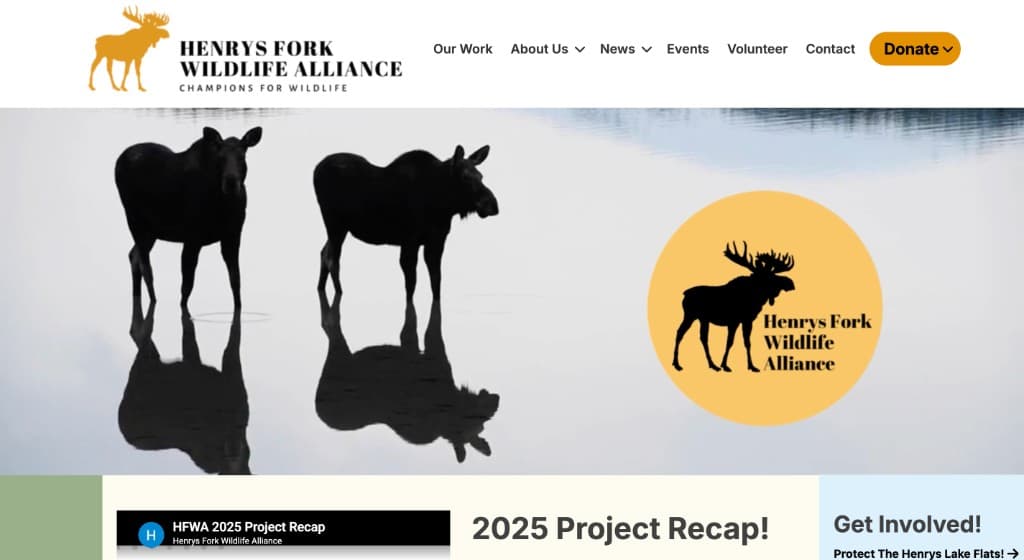
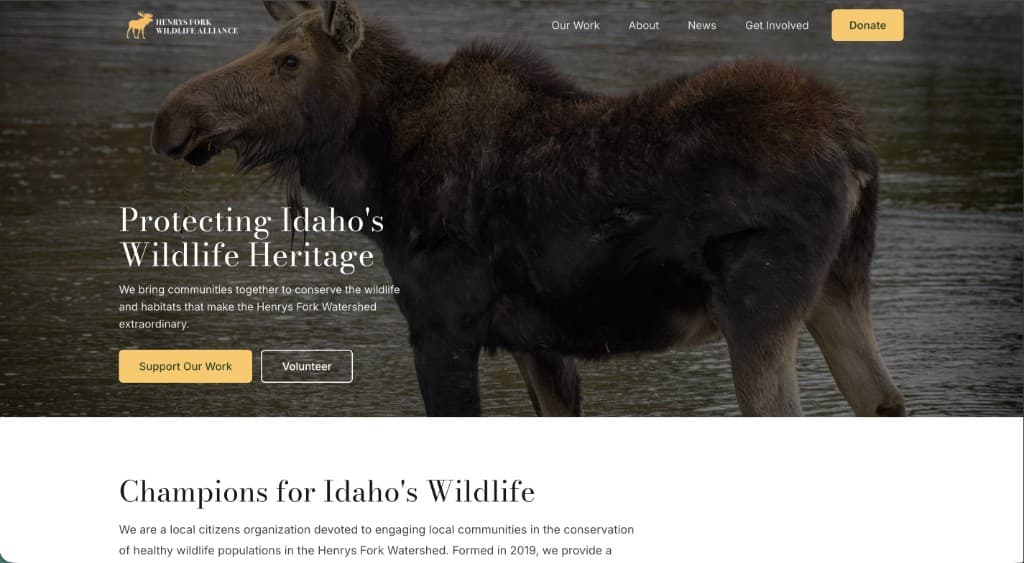
The old homepage: dropdown donate menu, seven nav items with dropdowns, a massive logo circle competing with the hero image, and content stacked with no hierarchy.The new homepage: transparent nav with five clear items, a direct donate button, full-bleed hero with a single clear message, and an immediate intro section below.
Identifying the Problems
Before designing anything, I talked to all four stakeholders and did a full content audit of every page on the existing site. I wasn't just cataloging what existed. I was mapping where content lived versus where a visitor would actually expect to find it.
The homepage was a junk drawer
The homepage had alerts, testimonials, event listings, video embeds, news cards, donation CTAs, and program links, all stacked on top of each other with no clear hierarchy. The team told me directly: "Too many competing banners at top of page" and "visitors have to look around to find out our main message."
The core problem was that the homepage was trying to serve every audience and every purpose at once. First-time visitors looking for basic orientation were competing for attention with returning community members looking for an event date. When everything is emphasized, nothing is. The page had no focal point, no narrative, and no clear next action.
Time-sensitive content had no system
HFWA regularly needs to push out urgent information: public comment deadlines, zoning meeting dates, bear activity warnings. Their only option was to manually add content blocks to the homepage. In their words: "Historically we have dumped this information onto our homepage which gets quite messy."
This is a common pattern with small org websites: the homepage becomes the default location for anything important because there's no infrastructure for urgency. Each new alert pushes previous content down, the page grows longer, and the original structure breaks. It's not a content problem. It's an infrastructure problem.
Information architecture served the org chart, not the visitor
The existing navigation reflected how HFWA thought about itself internally. "About Us" and "Our Work" had overlapping content, and mission language appeared on both pages, project recaps mixed with organizational history. Blog posts and community news were split across separate pages with different taxonomies. Events and volunteer opportunities were buried in a sidebar widget.
The donate button was a dropdown menu with multiple options, adding decision friction to the single most important conversion action on the site. When someone is ready to give money, the interface should make that as frictionless as possible instead of asking them to choose between three donation types first.
A new program needed interaction design from scratch
The team was launching a bear sighting and conflict reporting program: deploying electric fencing and "unwelcome mats" to properties with bear activity. They needed community members to report encounters quickly so the team could respond before situations escalated to lethal removal of a bear.
This wasn't a contact form. The quality of the data collected would directly affect whether HFWA could intervene in time. That meant the interaction design had to account for the actual context of use: someone on a phone, possibly on a rural trail with no formal address, who just saw a bear.
Information Architecture: One Job Per Page
The biggest decision on this project wasn't visual. It was structural. The old site scattered content across pages with overlapping purposes. I reorganized everything under a strict rule: every page gets exactly one job. If content doesn't serve that page's job, it moves somewhere else. This sounds simple, but it required pulling the entire site apart and reassembling it.
The restructured sitemap
Homepage → Orient. Introduces HFWA, surfaces one community notice, shows latest news, and offers clear CTAs. Its only job is to answer "what is this organization and what should I do next?"
About → Explain who. Mission, history, team bios, community voices, partners, JEDI policy. Everything about the organization as an entity lives here.
Our Work → Explain what. Active campaigns, the Island Park Bears program, past project recaps, and a "suggest a project" pathway. Everything about the work itself lives here.
News → Inform. The old site split content between "Blog" and "All News" with different taxonomies, forcing visitors to check two places. I merged them into a single unified feed with category filtering. One place, all updates.
Get Involved → Activate. Events, volunteering, newsletter signup, employment. Every action a community member might take is consolidated here. On the old site, these were scattered across sidebars and subpages.
Report a Sighting → Collect. Brand new. A dedicated interactive tool for reporting bear encounters.
The trickiest split was "About" vs. "Our Work." On the old site, these pages overlapped so much that visitors couldn't tell which one had what they needed. The fix was a clean conceptual line: About is the organization (who we are, why we exist, who's involved), Our Work is the output (what we're doing, what we've done, what we need help with). Once that distinction is explicit, content sorts itself naturally.
I also replaced the donate dropdown with a single direct button. Fewer choices, faster conversion.
Designing the Community Notice System
The homepage content-dumping problem needed a systemic fix, not a cosmetic one. Telling the team "don't put stuff on the homepage" doesn't work if there's nowhere else for urgent content to go.
The solution: a conditional alert card
I designed a notice card that sits in the hero section of the homepage, alongside upcoming events:
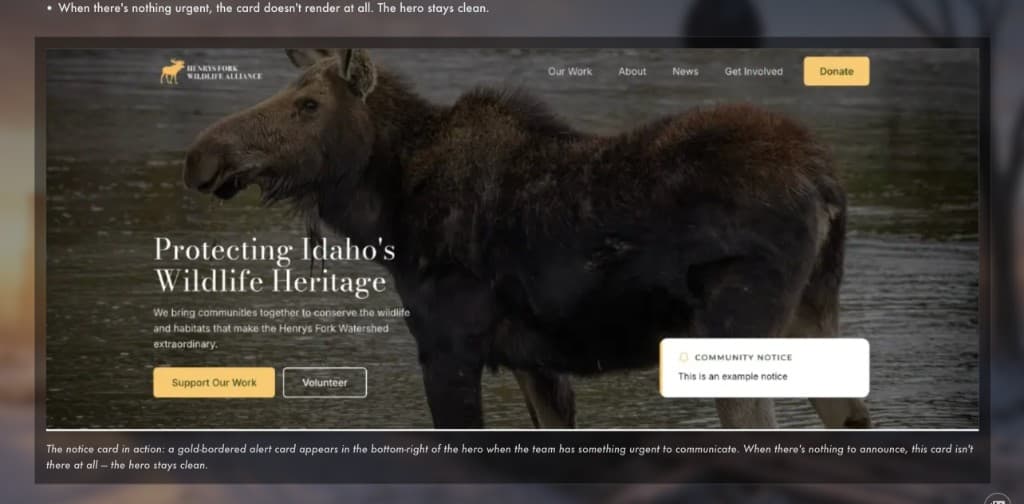
When there's an urgent alert (public comment deadline, bear activity warning, zoning meeting), the team types it into the WordPress dashboard and a gold-bordered notice card appears prominently in the hero.
When there's nothing urgent, the card doesn't render at all. The hero stays clean.
The notice card in action: a gold-bordered alert card appears in the bottom-right of the hero when the team has something urgent to communicate. When there's nothing to announce, this card isn't there at all, and the hero stays clean.
This matters because the alternative approaches all have problems. A permanent alert section that's sometimes empty teaches visitors to ignore it. That's banner blindness. A modal or popup is interruptive and annoying, especially for returning visitors. An alert bar above the header competes with navigation.
The conditional card approach means the alert is prominent when it exists and invisible when it doesn't. The hero section composition adjusts automatically. And the team gets a predictable, designated place for urgent content, which means they stop asking "where do I put this?" every time something comes up.
The implementation is simple (a visibility toggle and a text field in the CMS), but the design decision behind it is about giving the organization a sustainable pattern for urgency instead of a recurring mess.
Interaction Design: The Report a Sighting Form
This was the most interesting design problem on the project. It's the only part of the site that's a real product, a tool people use in the field to submit data that drives operational decisions.
Context of use
The typical user is a community member in Island Park, Idaho who just encountered a bear. They might be:
On their phone, possibly on a rural road or trail
At a location with no formal street address
Unsure what species of bear they saw
Stressed, since they may have had property damage or a close encounter
This context drives every decision about the form.
Location input: map-first, not address-first
The default pattern for location capture is an address field. That doesn't work here. Many sightings happen on forest roads, trails, campgrounds, and private land without clear addresses. Asking someone to type "the road near Big Springs, I think it was called Mesa Falls Scenic Byway, maybe a mile past the turnoff" is asking for bad data.
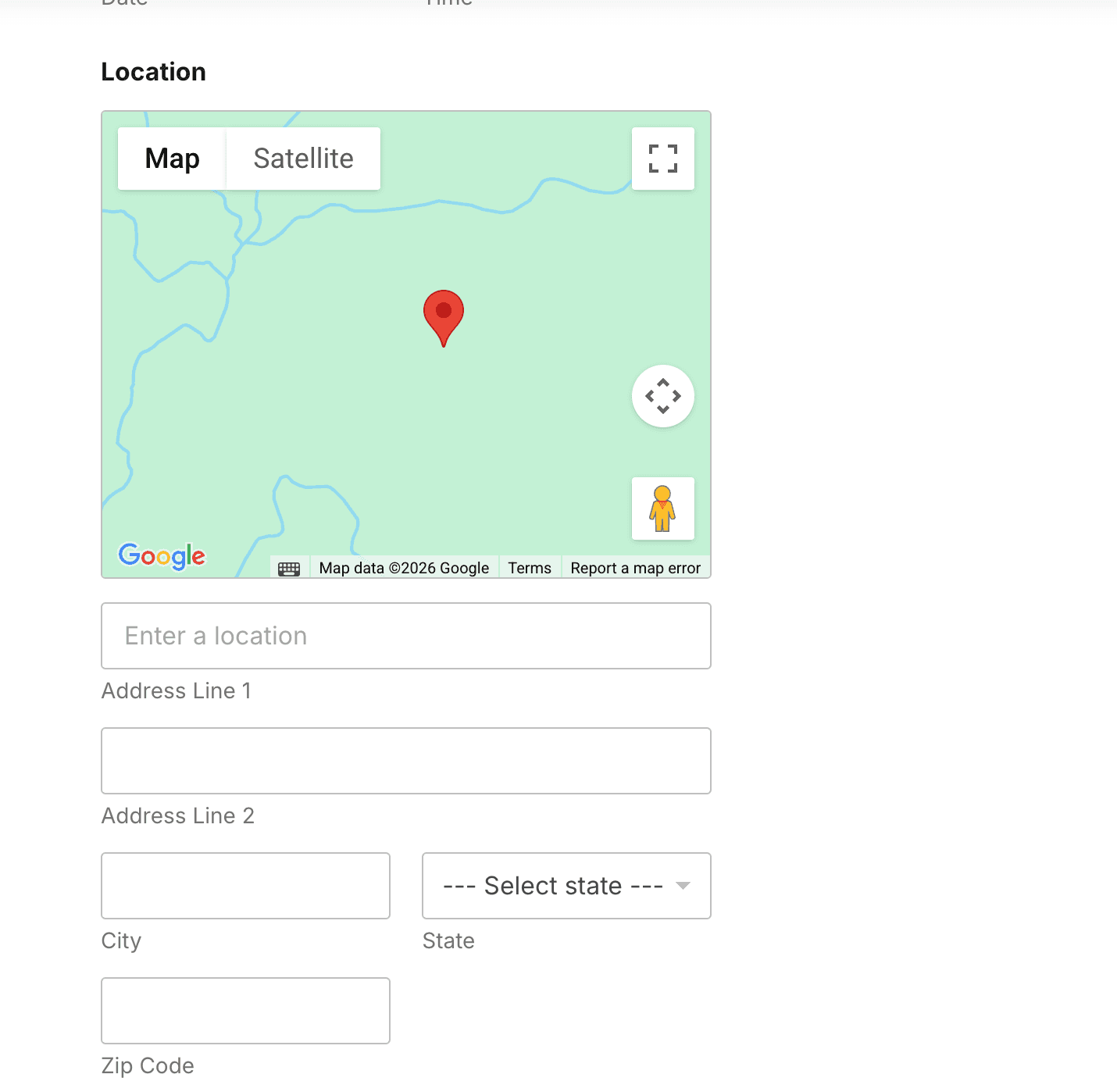
I set up an interactive map where the user taps to drop a pin at the sighting location. The pin reverse-geocodes to auto-populate the address fields (street, city, state, zip). This serves two purposes: it's faster for the user (one tap vs. typing), and it produces more accurate location data for the HFWA team who need to know exactly where the bear was.
The map interaction: the user taps to drop a pin, and the address fields below auto-populate via reverse geocoding. The map defaults to the Island Park area so users don't have to zoom in from a world view.
The map is centered on the Island Park area by default, so the user doesn't have to zoom in from a world view. Small detail, but it cuts unnecessary interaction for an audience that's almost always reporting from the same region.
Conditional logic: show only what's relevant
One of the key data points HFWA needs is whether a bear got into human attractants, and if so, what kind. The form presents a dropdown: trash, bird feeder, BBQ, pet food, chicken coop, bee hive, vehicle, fridge/freezer, ice chest, other.
If the user selects "Trash," a follow-up question appears: "Was it in a bear-resistant trash can?" This question is operationally critical for HFWA. It tells them whether to deploy a bear-resistant container, but it's irrelevant for any other attractant type.
This is progressive disclosure: don't show a field until the user's previous answer makes it relevant. It keeps the form shorter for most people while capturing the specific detail the team actually needs. Showing every possible field upfront would make the form look longer and more intimidating than it actually is, which kills completion rates.
Species identification: designing for uncertainty
The form asks what species the bear was: grizzly, black bear, or unsure. Most people in the area genuinely cannot tell the difference. Making this a required field would produce one of two bad outcomes: people would guess (bad data), or people would abandon the form (no data).
Instead, species is optional, and the field links to HFWA's bear identification guide. This treats the form as an educational touchpoint, so even if the user can't identify the species right now, they learn how to for next time. And for HFWA's purposes, an honest "unsure" is more useful than a confident wrong answer.
Form structure: two clear sections
The form is split into "Your Information" (name, phone, email) and "Sighting Details" (location, species, attractants, description, photos). This does two things: it sets expectations about length before the user starts. It's not a 20-field monster: it's two short sections, and it groups related fields logically so the user isn't jumping between personal info and incident details mid-form.
Content Strategy: Navigating Local Politics
Partway through the project, I learned that "wildlife crossings" (infrastructure that helps animals safely cross highways) is politically loaded in the Island Park community. Some residents see it as government overreach on land-use policy. HFWA advocates for these crossings as a conservation measure, but using that specific terminology on the site risked alienating a significant portion of the audience.
Rather than using the contested term, the site frames the same work around outcomes: "protecting wildlife and landscapes" and "reducing wildlife-vehicle collisions." Same conservation goals, but phrased in a way that doesn't immediately trigger political resistance.
This isn't about hiding what HFWA does. It's about meeting the audience where they are. The site needs to work for the entire Island Park community, including people who support conservation but have complicated feelings about specific policy approaches. Sometimes the highest-impact design decision isn't a layout or a component; it's choosing the right word.
CMS Architecture as UX
This section doesn't have flashy visuals, but it might be the most important design work on the project.
The old site required a developer for routine content updates. Someone on the HFWA team wanted to change a hero image? Call the developer. Add a new board member to the About page? Call the developer. Post a community notice about an upcoming zoning meeting? Call the developer. For a volunteer-run nonprofit with no tech budget, this meant content went stale, updates were slow, and the team was permanently dependent on outside help for basic changes.
I designed the backend content architecture around a simple principle: the CMS is a user interface too, and the HFWA team are its users.
That meant every content element on the site needed a corresponding field in the dashboard that a non-technical person could find, understand, and edit without instructions. Not "edit the PHP template," not "paste this shortcode," not "change the image URL in the custom HTML block." Real labeled fields with clear purposes.
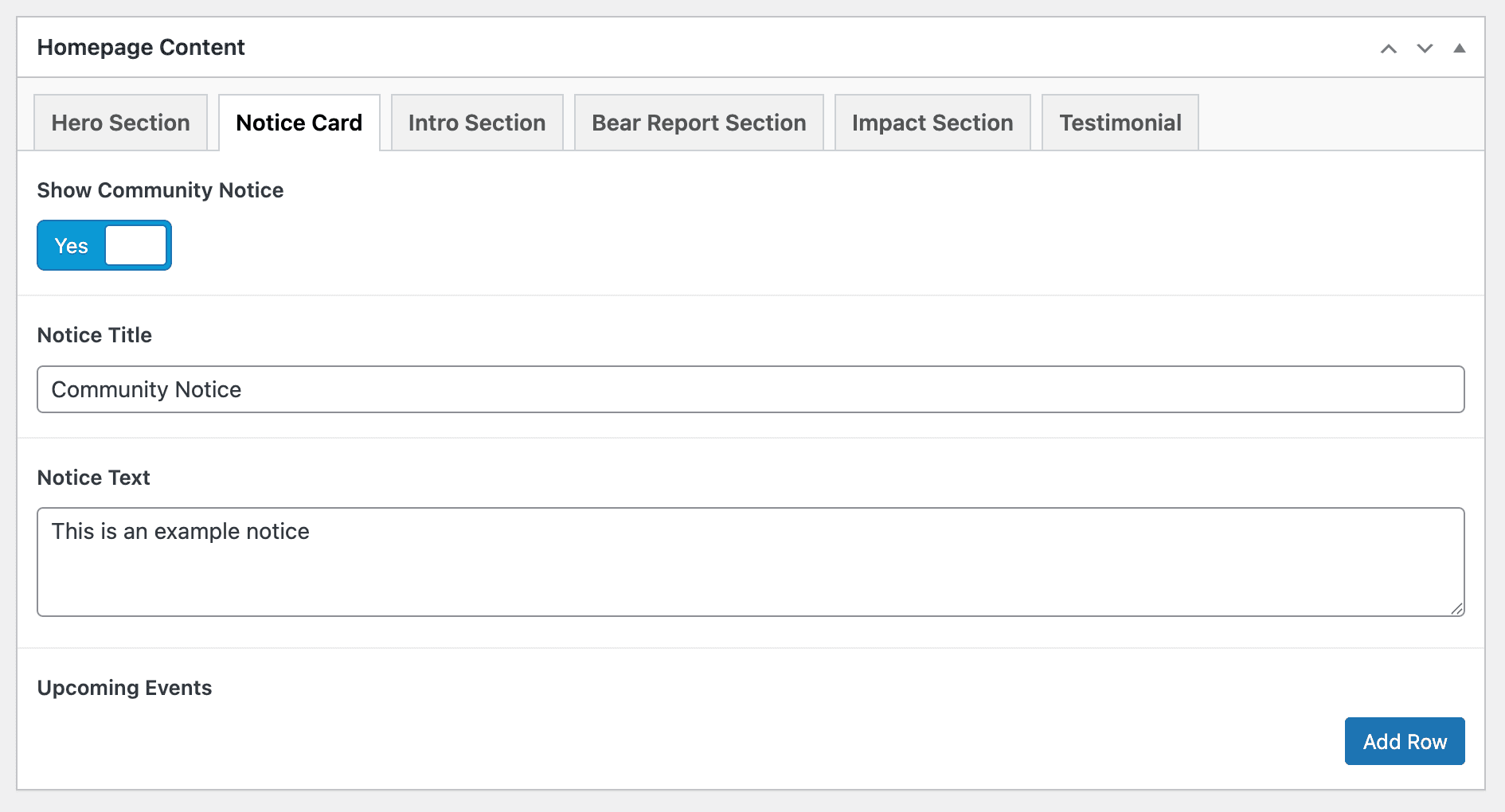
The homepage content editor: tabbed sections for each part of the page, a simple toggle to show or hide the community notice, and clearly labeled fields for the notice title and text. The "Upcoming Events" repeater lets the team add or remove events with one click. This is what the team actually interacts with, and it needs to be just as considered as the frontend.
Here's what that looks like in practice:
Hero sections: Each page has its own editable hero fields (image, headline, subtext, CTA button text and URL). The team doesn't need to understand page templates to update what visitors see first.
Community notice system: A text field and a visibility toggle. Type the message, flip the toggle to "show," and it appears in the homepage hero. Flip it off and it's gone. No code, no layout rearranging.
Upcoming events: A repeater field where each row is an event (title, date, link). Add a row for a new event, delete the row when it's passed. The homepage pulls the latest ones automatically.
Featured projects: Each spotlight is a structured set of fields (heading, description, image, link). The team fills in the fields and the layout handles itself.
Team bios and photos: Adding a new board member means filling in a name, role, photo, and bio. No page restructuring, no CSS changes, no figuring out where in HTML the new card goes.
Testimonials: A repeater field where each row is a quote, an attribution, and optionally a photo. Add quotes, remove quotes, reorder them. The page adapts.
Partner logos: Upload an image, it appears in the partners grid. Drag to reorder. Delete to remove.
The reason this matters as UX work, not just as "backend development," is that it directly determines the long-term quality of the frontend experience. A beautifully designed site that requires a developer for every content update is a site that looks great on launch day and slowly degrades after. The team stops updating because it's too hard. Content goes stale. The hero still says "Summer 2025" in November. The events section shows something from three months ago. The site becomes a snapshot of the day it launched rather than a living resource.
By treating the dashboard as an interface that needs to be usable, not just functional, the design stays alive after I walk away. That's the whole point of working with a volunteer team: if they can't maintain it independently, the redesign has an expiration date.
Visual Design
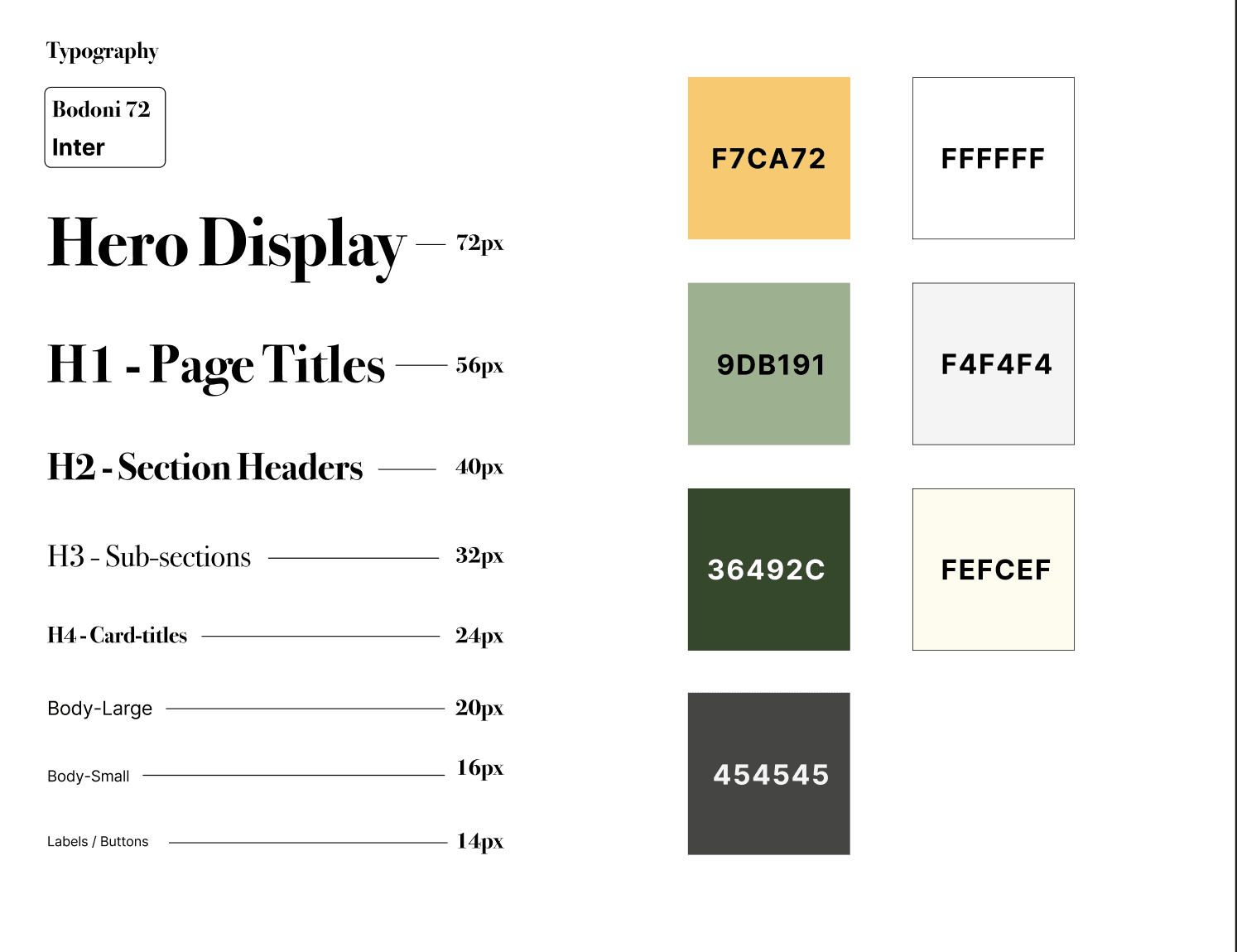
The type and color system: Bodoni 72 for display headings, Inter for body text, and a palette pulled from the landscape (gold, sage, dark green, cream, with a neutral dark gray for secondary text).
I built a design system grounded in the feel of Island Park: warm, natural, approachable. Not corporate-nonprofit, not outdoorsy-cliché.
Typography
Bodoni Moda (italic) for section headings. It gives the site a nature journal quality, editorial and organic without being decorative. It signals "this is a place that cares about the land" without resorting to leaf icons or wood textures.
Inter for body text: clean, high readability, gets out of the way.
Montserrat for labels and UI elements: sturdy and utilitarian, used for navigation, buttons, and form labels where clarity matters more than personality.
Color palette
Gold #F7CA72: warmth, optimism, primary accent and CTA color. It ended up doing a lot of heavy lifting across the site (notice card borders, button fills, hover states, decorative quote marks).
Sage #9DB191: natural, grounded, secondary accent for supporting elements and subtle highlights.
Dark Green #36492C: authority and depth for primary backgrounds and text. Evokes forest canopy without being literal about it.
Cream #FEFCEF: the default page background. Softer than white, which felt too clinical for a conservation nonprofit.
Visual elements
Full-bleed wildlife photography from local photographers, with a permission and credit system built into the site
Topographic line art as a subtle background texture, a nod to the landscape without competing with content
Rounded cards and generous whitespace to keep the tone approachable and prevent the site from feeling institutional
Stakeholder Feedback
"The site looks great and so much more professional."HFWA Team
"You are amazing, we can not thank you enough for all your help."HFWA Team
What I'd Do Differently
I didn't do formal user research. I relied on stakeholder conversations and my own content audit. The team knew their problems well, so the direction was solid, but if I did this again, I'd run task-based usability tests with a few Island Park residents before building. The Report a Sighting form is the highest-stakes interaction on the site, and I designed it based on assumptions about field use without actually watching someone try to submit a report from their phone on a trail. Stakeholder insights tell you what the organization needs. User testing tells you whether the interface actually delivers it.
I designed desktop-first. A significant portion of this site's users are on mobile. Some are literally reporting bear sightings from a trail. Starting with desktop layouts in Figma and adapting for mobile meant responsive issues got caught late rather than designed for upfront. For a site with this usage context, mobile-first would have been the right call.
Stakeholder reviews could have been more structured. I shared work at key milestones, but a more regular cadence, especially at the wireframe stage, would've caught misalignments earlier and saved revision time during development. The most expensive feedback is feedback that arrives after something is already built.
What I Took Away
Designing for a real client, even as a volunteer, is a completely different thing than a personal project. You're navigating opinions, managing scope, making tradeoffs between what's ideal and what ships, and discovering that language and local politics matter as much as pixels.
This project reinforced three things for me. CMS architecture is UX work: how content is structured in the backend directly determines whether a non-technical team can keep the site alive. The best design for a small team is the one they can actually maintain without outside help. And sometimes the most impactful design decision is choosing the right word instead of the right layout.
Volunteer project for Henry's Fork Wildlife Alliance, a 501(c)(3) in Island Park, Idaho. Site partially live as of March 2026.